
Shopify SEO: automating meta titles and descriptions
Your store has two fields that decide whether a Google searcher clicks your result or the one below it: the meta title and the meta description. On most Shopify stores, both are empty. Shopify quietly falls back to your product title and the first lines of your description, and Google rewrites whatever it doesn’t like.
This guide covers the whole job: what the two fields actually do (less than SEO apps claim, more than most merchants assume), where the Shopify meta title and description fields hide in the admin, the writing rules with exact character limits, and how to clear a 1,000-product backlog without publishing junk.
One definition to keep: a meta title is the headline of a free ad Google runs for your page, and the meta description is its body copy. Write them like ad copy, not like a database field.
What meta titles and descriptions still do for a store
Meta titles and descriptions decide click-through, not rankings: the title is a real but small ranking signal, and the description is pure snippet copy that Google shows under your link. Google’s own documentation says meta descriptions aren’t used for ranking. They’re used for the two lines that convince a human to click.
That’s worth being precise about, because plenty of SEO tools sell these fields as a ranking lever. My honest position, and it costs me sales to say it: filling your meta fields will not move you from page 3 to page 1. What it moves is the click. If you rank fifth and your snippet answers the searcher better than the third result does, you take traffic your position didn’t earn. Across a whole catalog, that’s the difference worth automating.
And the cost of leaving them blank is real. Google assembles a snippet from whatever it finds on your page. Sometimes that’s fine. Often it’s a sentence fragment about fabric care. On 1,000 products, blank fields are 1,000 coin flips you’re not even watching.
Where Shopify hides the meta title and description fields
Every Shopify product has both fields under Search engine listing at the bottom of the product editor: click Edit next to the preview and you get a Page title and a Meta description box. Collections, pages, and blog posts have the same section.
The defaults are the trap. Shopify pre-fills the page title from your product title and the meta description from the start of your product description. If your descriptions are supplier text, your Google snippets are supplier text too: the duplication problem I covered in the dropshipping guide follows you straight into the search results.
Why the fields stay empty is no mystery. They’re below the fold, they’re edited one product at a time, and there’s no comfortable bulk workflow in the admin: the product CSV does carry SEO Title and SEO Description columns, but that’s a spreadsheet project, not a Tuesday afternoon task.
Writing rules that survive 2026
Four rules cover it: stay inside the limits, put the search term near the front, write one benefit and one reason to click, and never promise what the page doesn’t deliver.
| Field | Limit | The rule that matters most |
|---|---|---|
| Meta title | 60 characters | Search term near the front, brand at the end |
| Meta description | 155 characters | One benefit, one differentiator, one reason to click |
| Image alt text | 125 characters | Describe the image, not your keyword list |
Over the limit, Google cuts the ending off. Far under it, you’re leaving free ad space on the table.
A worked pair for a product page:
Meta title: Non-Slip Hot Yoga Mat, 6mm | Brandname
Meta description: The mat that grips when your hands don’t. 6mm cushion, machine washable, free returns for 30 days.
Two more rules that don’t fit in a table. One product, one intent: each page should target the one query it can honestly win, not five at once. And no clickbait: the snippet is a promise. Break it and the visitor bounces, and enough bounced promises teach Google to rewrite your snippets for you.
Automating the backlog without publishing junk
The automation that works generates meta fields alongside the description from real product data, shows you everything before it publishes, and lets you approve per product. The automation that hurts is any tool that writes 1,000 snippets straight to your live store.
First, the arithmetic that makes automation worth it. At a realistic two minutes per title-and-description pair, a 1,000-product catalog is 33 hours of typing into tiny boxes. (The 500th one is not more fun than the first.) That’s why the fields are empty, and why willpower isn’t the fix.
This job is part of why I built InkForge, an AI product description app for Shopify with preview and rollback. One credit covers one product: the description, the meta title, the meta description, and the image alt text, generated in your brand voice and inside the limits from the table above. Every field shows up in a preview next to what’s currently live, you approve or edit per product, and version history keeps the old values one click from restored.
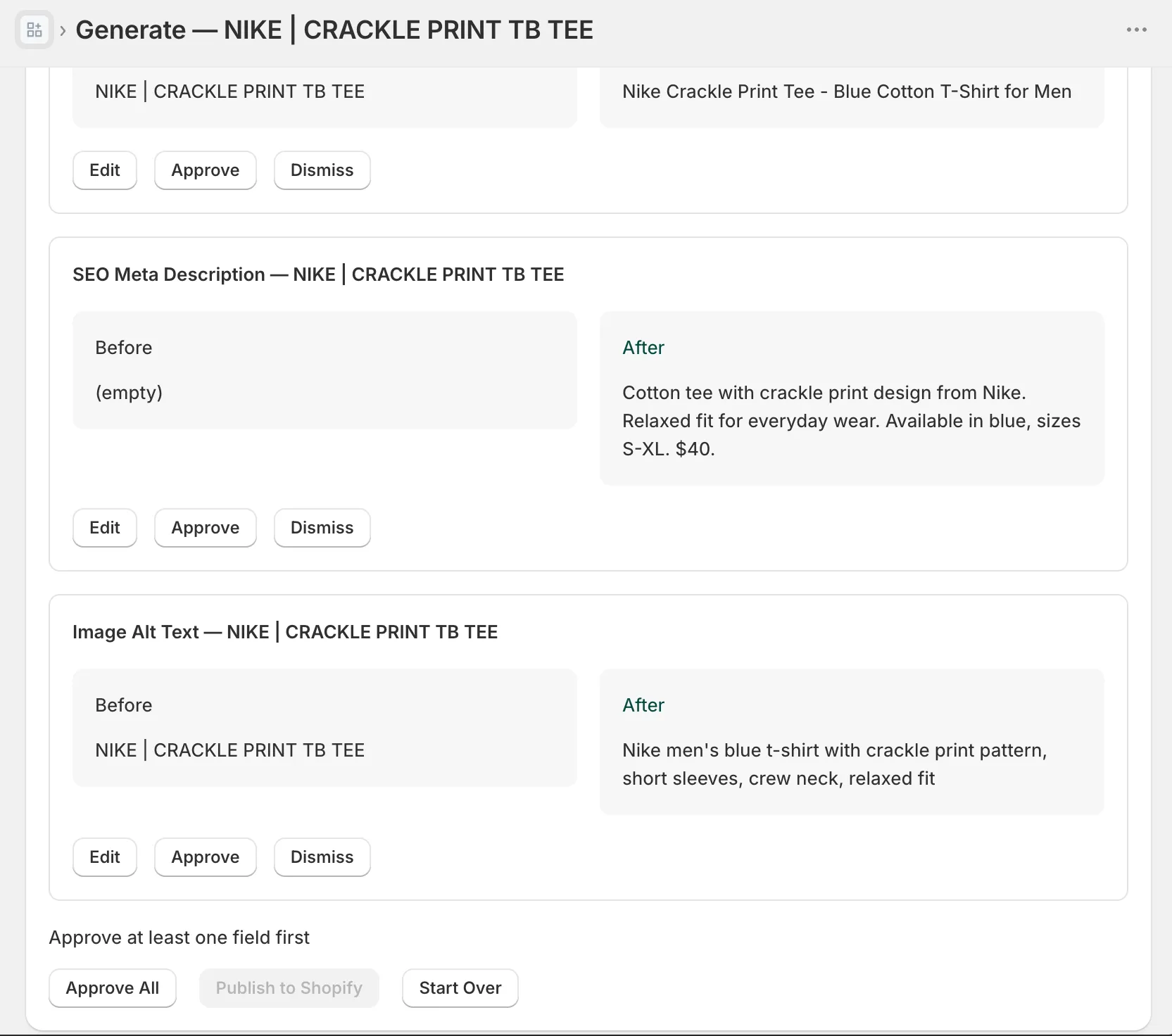
Whatever tool you use, keep the review pass. Meta fields are small, so skimming 500 of them is an afternoon, not a week. You’re checking that the search term is really there, that the promise matches the page, and that the tone is yours. Publishing 1,000 unread snippets just moves the junk from Google’s autogenerated snippets to yours.
Alt text: the third field worth filling
Alt text is the 125-character description of a product image that Google Images indexes and screen readers read aloud, and on most stores it’s empty or still contains the upload filename. IMG_4032-final-2.jpg describes nothing to anyone.
The rules fit in a breath: describe what’s actually in the picture (“hand-poured soy candle in amber glass jar, lit on a wooden table”), skip the “image of” prefix because screen readers add it, no keyword lists, and every image gets one, not just the first. It rides along in the same generation pass as the meta fields, so there’s no reason to leave it for a someday-project.
A catalog-wide checklist
The full backlog, in order, doable in one week of short sessions:
- Export your products to CSV. Baseline and undo in one file, 30 seconds.
- List what’s missing. Products with an untouched Search engine listing section are your backlog, and there are usually more than you think.
- Bestsellers first. The pages that already get impressions gain the most from a better snippet. Fix their descriptions too while you’re there; the four-part structure is the companion guide.
- Bulk generate all four fields in one pass. Description, meta title, meta description, alt text. One pass, one review.
- Review per product, then publish. Approve rows, edit the ones where the tool guessed wrong, publish what you approved.
- Check Search Console two weeks later. Performance report, filter to your fixed pages, watch click-through rate. That number moving is the whole point.
If you’d rather have steps 4 and 5 handled in one pass, the free plan covers your first 50 products: enough to fix your bestsellers’ snippets this week and judge the output before the long tail.
FAQ: Shopify meta titles and descriptions
Do meta descriptions help Shopify SEO? Not as a ranking factor. Google’s documentation is explicit that meta descriptions don’t influence ranking; they feed the snippet under your link. A good one raises click-through, which is the traffic you wanted from ranking in the first place.
What are the character limits for Shopify meta titles and descriptions? Keep meta titles under 60 characters and meta descriptions under 155. Google technically measures pixel width, not characters, but staying inside those counts keeps your titles and snippets from getting cut off on desktop and mobile.
Can I bulk edit meta titles and descriptions in Shopify? Yes, two practical ways. The product CSV carries SEO Title and SEO Description columns you can fill in a spreadsheet and re-import. Or an app can generate both fields per product from your product data; in InkForge they’re part of the same credit as the description and alt text, with a preview before anything publishes.