
AI product descriptions for dropshipping: complete guide
If you run a dropshipping store, your product descriptions were probably written by your supplier. The same text is live on dozens of other stores selling the same item. Google can see that, and so can your customers.
This is the problem AI product descriptions solve well, because dropshipping copy is a volume and duplication problem, not a creativity problem. An AI product description is the supplier’s facts rewritten for one specific buyer, in your store’s voice. This guide is the complete workflow around that sentence: find the products that need work, define one brand voice, bulk generate with a per-row review, and keep a safety net so no batch is ever final. Plus what a 500-product cleanup actually costs.
One warning before the steps: mass-publishing AI text you never read makes your store worse, not better. The review step is not optional.
The dropshipping description problem
An imported dropshipping product arrives with one of three descriptions: the supplier’s boilerplate, machine-translated English, or nothing at all. Import tools copy the listing as it exists at the source, and at the source, nobody was writing for your customer.
Boilerplate is the most common. Supplier text is written by a manufacturer to sell stock to retailers: a keyword-stuffed title, a spec table, sometimes a size chart that belongs to a different product. Facts, but no reason to buy.
Machine translation is the second flavor. The grammar is off in ways you stop noticing after importing 50 products. Your customers notice in the first three seconds.
And many fields arrive simply empty, because the source listing had photos, a price, and nothing else.
Then there’s volume, the reason none of this gets fixed by hand. At 15 minutes per rewritten description, an 800-product import is 200 hours of writing: 100 evenings at two focused hours a night. Nobody does it, so the catalog stays as imported.
Why copied supplier text hurts ranking and trust
Copied supplier text hurts a dropshipping store twice: Google has no reason to rank your page over the dozens carrying the same paragraph, and buyers recognize supplier copy on sight.
The ranking half is mechanical, not a penalty. When many stores publish the same description, Google shows one or two and filters the rest as duplicates, and the pick almost never goes to the newest store with the least authority. With copied text you’re not losing the copy competition; you’ve opted out of it.
The trust half is faster. Shoppers have seen thousands of these pages: inconsistent tone from one product to the next, specs pasted into the title, “AAA+++ quality” promises. Nobody has ever added a posture corrector to cart because of AAA+++ quality. (If you have, write to me.) Each signal says the store never touched the product, and the visitor starts guessing at the real delivery time.
The quiet third cost: imports leave the meta title, meta description, and image alt text empty. Those fields decide how your page looks in a search result. I broke down what belongs in each in the first guide.
| Imported supplier text | What your store page needs |
|---|---|
| Written to sell stock to retailers | Written to sell one product to one shopper |
| Identical on every store that imported it | Text that exists only on your store |
| A different tone on every product | One voice across the catalog |
| Empty meta fields and alt text | All three filled, within character limits |
| Specs dumped into the title | Scannable bullets under a benefit-led opening |
Step 1: find the products that actually need work
Start with a list, not a rewrite: filter your catalog for missing or copied descriptions, then sort that list by what earns money.
The missing ones take one export, because Shopify’s product filters don’t cover descriptions. Go to Products, then Export, then CSV, and sort the file by the Description column: the blank rows are your content debt, counted.
The copied ones take one more step. Pick one distinctive sentence from a product’s description and google it in quotation marks. The result count is roughly the number of stores you share that copy with. Check your five bestsellers; the number is rarely pleasant.
Then work the list in this order:
- Bestsellers with copied or thin copy. Revenue already flows through those pages.
- High-traffic pages that don’t convert. The copy is the likely leak.
- New arrivals, before they get indexed badly.
- Everything else, in batches, later.
My honest take, one a description app founder probably shouldn’t publish: most imported catalogs should shrink before they get rewritten. If you imported 1,200 products and 40 ever sold, rewriting 1,200 descriptions is polishing pages nobody visits. Hide the dead listings, keep the couple hundred you actually promote, and fix those properly. A smaller catalog of real pages beats a warehouse of duplicates. It’s also cheaper to fix.
Step 2: define one brand voice for the whole catalog
A brand voice is three decisions written down: who your audience is, how you sound, and which words you never use. For a dropshipping store, the voice is the one part of the product page competitors can’t import: same photos, same specs, same supplier, but not your voice.
Make the three decisions once, for the whole store:
- Audience. Who actually buys: gift shoppers, parents, gym regulars? And what they’re afraid of: wrong size, cheap materials, long delivery.
- Personality. Three adjectives plus two example sentences written the way you’d talk to a customer. “Warm but direct” means nothing until you show it.
- Banned words. For imported catalogs I’d start with: multifunction, premium quality, best gift choice, new style, and every claim you can’t back.
I covered voice building, and the four-part description structure it feeds, in how to write Shopify product descriptions that convert. One dropshipping-specific rule to add: if your store spans niches, define one voice per collection rather than per product. Fifty voices is the same as no voice.
Step 3: bulk generate AI product descriptions, then review every row
Bulk generation is safe when it works like a queue you approve, not a script that publishes on its own. The workflow: send your Step 1 list to the generator, then walk the rows and approve, edit, or reject each one. Nothing goes live unread.
This step is the reason I built InkForge, an AI product description app for Shopify with preview and rollback. You select the products, the batch runs in the background with live progress, and each product comes back as the new description next to the old one, plus the meta title, meta description, and image alt text. One credit covers all four fields. You publish per row or per batch, and a row that fails doesn’t kill the rest.
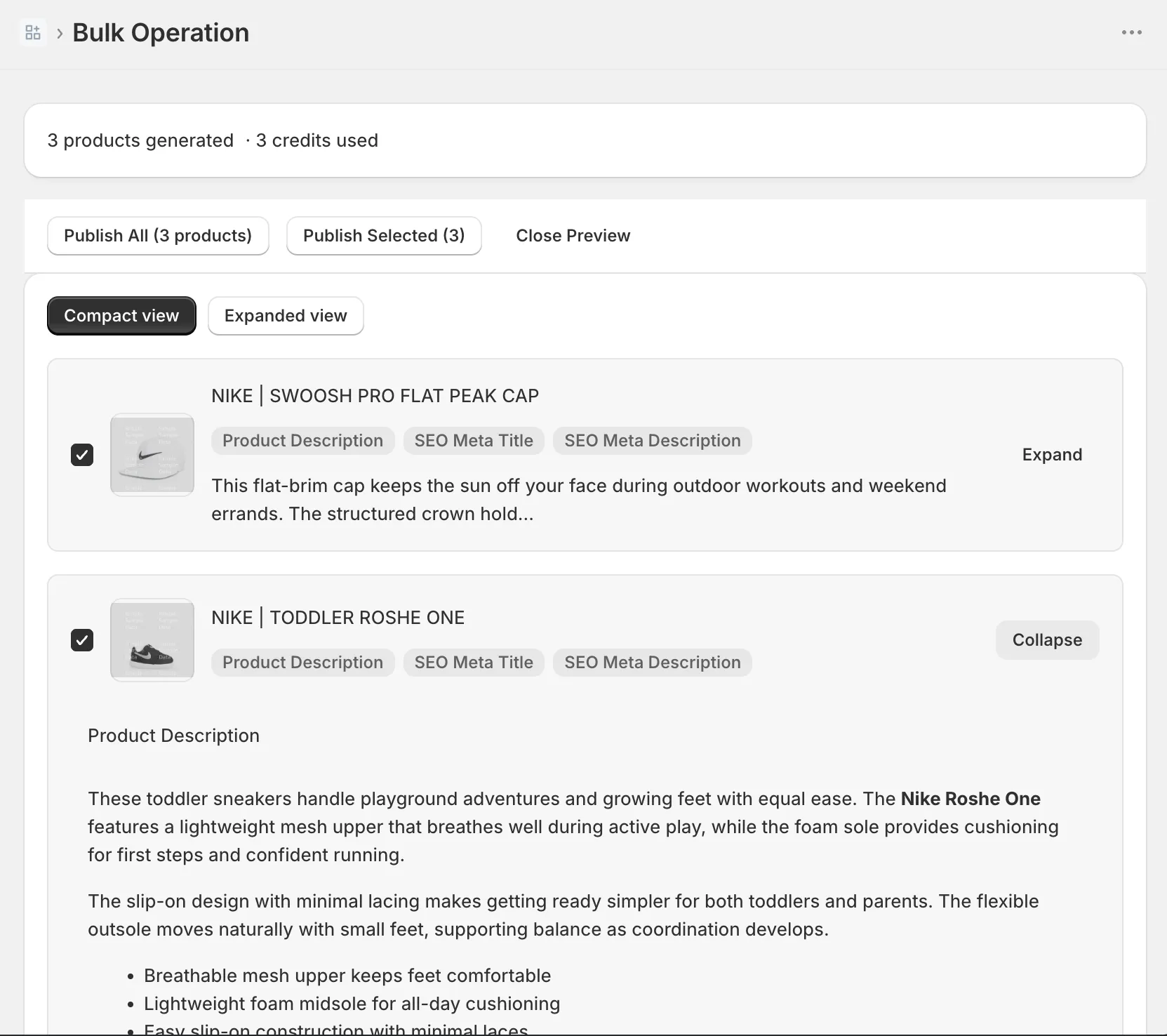
The review pass is judgment, not rewriting. You’re scanning for rows where the AI had too little input: it can’t know your shipping promise or how the fabric feels if nothing told it. Edit those by hand. That’s still two minutes per product instead of fifteen.
One before and after
Before, as imported:
Star Projector Night Light 21 Modes Multifunction Bluetooth Music Starry Galaxy Lamp USB Remote Control Kids Bedroom Party Home Decor Best Gift
After, generated in a defined brand voice:
Turn a kid’s ceiling into a slow-moving night sky. This projector is for parents who want lights-out to stop being an argument: pick one of 21 scenes, set the timer, and the room does the persuading.
- 21 projection modes with adjustable brightness and drift speed
- Built-in Bluetooth speaker for bedtime playlists
- Remote control that works from the doorway
- Auto-off timer: 1, 2, or 4 hours
Free shipping and 30-day returns.
Same facts, different job. The first is a search string. The second is a page a parent can say yes to.
Step 4: keep a safety net
A safety net for bulk edits means two things: a CSV export taken before the batch, and version history in whatever tool writes to your store.
The CSV takes 30 seconds: Products, then Export, then CSV. Shopify bulk edits are permanent and Shopify keeps no version history of product content, so that file is your only native undo. Take one before every batch, no exceptions.
Version history is the second net, and it has to live in the tool doing the writing: every version of every field, timestamped, restorable in one click. It’s the difference between a sideways batch costing you a minute and costing you a weekend.
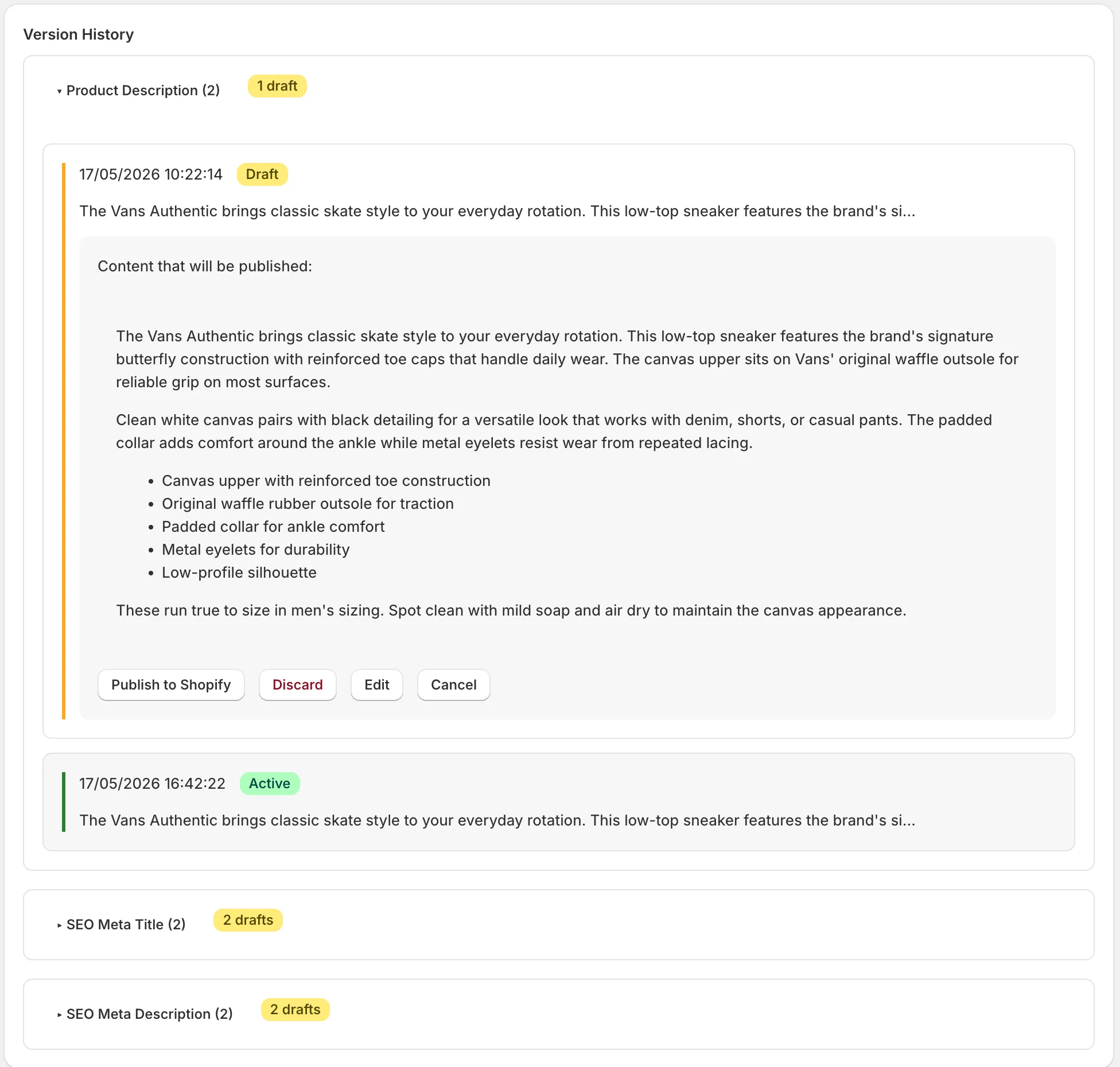
This matters double for dropshipping, because your first brand voice will be slightly wrong somewhere: too playful, too stiff, aimed at the wrong buyer. Regenerating a collection after you tighten the voice only feels free when the previous version is one click away. A batch you can roll back is a draft. A batch you can’t is a gamble.
What a 500-product cleanup actually costs
A 500-product description cleanup costs about $15 and an afternoon of reviewing with a credit-based Shopify app, or about 125 hours if you write every description yourself:
| Option | Time | Money |
|---|---|---|
| Leave the supplier text | none | $0, and the duplicate-content problem stays |
| Rewrite by hand | about 125 hours at 15 minutes each | $0 |
| Bulk generate, then review | an afternoon of reviewing | $15 |
The credit math, using my pricing because it’s the pricing I know: in InkForge, one credit is one product, and it covers the description, meta title, meta description, and image alt text together. The free plan includes 50 credits per month. The Starter plan is $15 per month for 500 credits, which is where the 500-product number comes from. Credits refresh monthly and don’t roll over, so a 1,000-product catalog is two batches across two months, $30 total. Though if you took Step 1 seriously, you’re probably not rewriting 1,000 products.
If you want to test the workflow without paying anything, the free 50 credits cover the bestseller list from Step 1, which is where the money is anyway. Run it on your worst supplier description first and judge the output against the import. If it isn’t clearly better, you’ve lost nothing.
FAQ: AI product descriptions for dropshipping
Are AI product descriptions good for dropshipping? Yes, dropshipping is the best case for AI product copy. The problem is volume and duplication: hundreds of imported products carrying the same text as dozens of other stores. AI handles the volume, your brand voice handles the differentiation, and your review pass handles the quality. The rule that keeps it safe: never publish output you haven’t read.
Will rewriting supplier descriptions help my store rank on Google? It removes the reason Google was skipping your pages. Duplicate supplier text gives Google no reason to show your page over the other stores carrying the same paragraph. Unique copy plus filled meta titles, meta descriptions, and alt text gives each page its own footprint. It’s not instant, new stores still need time and links, but duplicate copy caps you at invisible.
How much does it cost to fix a dropshipping catalog’s descriptions? Between $0 and $15 for most stores. Writing by hand is free and takes about 15 minutes per product. With InkForge, one credit covers one product’s description, meta title, meta description, and alt text: 50 credits per month are free, and 500 credits cost $15 per month on the Starter plan. Prioritizing bestsellers first keeps the bill at the low end.