
How to write Shopify product descriptions that convert
A Shopify product description has one job: give one specific person enough confidence to click Add to cart. Most descriptions don’t do that job. They list what the product is instead of what it does for the buyer, they’re pasted from a supplier, or they don’t exist at all.
You don’t fix that by “writing more creatively.” You fix it with a repeatable structure, one consistent voice, and the SEO fields nobody fills in. That’s this guide. Real before/after examples included.
Why most product descriptions don’t convert
Most Shopify product descriptions fail in one of four ways: the spec dump, the supplier paste, writing for everyone, or the blank field. I build a description tool for a living, so I’ve read more Shopify product pages than is healthy. Before I wrote a line of InkForge code, I also read the one-star reviews of every major description app on the App Store. Different stores, different apps, same four failures:
The spec dump. “100% cotton. Three sizes. Machine washable.” Those are facts a buyer needs, but as supporting detail. As the whole description, it reads like a warehouse label. Specs answer questions. They don’t create desire.
The supplier paste. If you import products, the default description was written by a manufacturer for retailers, not by a seller for customers. And the identical text is live on dozens of other stores. Buyers recognize it instantly, and duplicated copy gives Google zero reason to rank your page over anyone else’s. If you dropship, I wrote a complete cleanup workflow for imported catalogs as a follow-up to this guide.
Writing for everyone. “Perfect for any occasion, great for everybody!” A description aimed at everyone convinces no one. Good product copy makes one specific reader think this was made for me, and accepts being ignored by everyone else.
The blank field. The most common failure of all, and it’s not laziness. It’s arithmetic. At 15 minutes per handwritten description, a 500-product catalog is three unbroken weeks of writing. Nobody has three weeks. So the field stays empty.
My blunt take: empty descriptions are a time problem, not a skill problem. Any merchant can describe their own product; nobody has three weeks to do it 500 times. And the tools that promised to fix this created a new fear instead: click Generate and watch your whole catalog get overwritten by text you never reviewed. That fear is the reason this article, and honestly my app, exist.
The structure that works
A converting product description has four parts in a fixed order: a benefit-led opening that names the buyer, a few sentences of lived experience, scannable spec bullets, and a reassurance close. You don’t need to be a copywriter. You need the order:
1. One benefit-led opening line that names the buyer. Not “Introducing our premium yoga mat.” Instead: “The non-slip mat for people whose hands sweat through hot yoga.” One sentence, one specific person, one payoff. This line does double duty: it hooks the reader on the page, and it’s often what Google shows when your meta description is weak.
2. Two or three sentences of lived experience. What does owning this feel like? Where is the buyer when they use it? This is where concrete, sensory detail belongs: the weight of the mug in the morning, the bag that survives the daily train commute. Stay specific. “Holds a 16″ laptop plus gym kit” beats “spacious interior” every time.
3. Scannable spec bullets. Now the facts, formatted for skimming: materials, dimensions, sizing, compatibility, what’s in the box. Buyers who are close to purchasing come here to kill their last doubts. One fact per bullet.
4. A reassurance close. Care instructions, shipping expectations, returns, guarantee. One or two lines. The buyer’s final hesitation is almost never about the product. It’s “what if it doesn’t work out?” Answer that before they ask.
As a fill-in skeleton:
[Who it's for + the payoff, one sentence]

[2 to 3 sentences: what it's like to own and use]

- [Material / dimensions]
- [Key spec]
- [Key spec]
- [What's included]

[Care / shipping / returns in one line]
Write in your brand voice, and keep it consistent at 500 SKUs
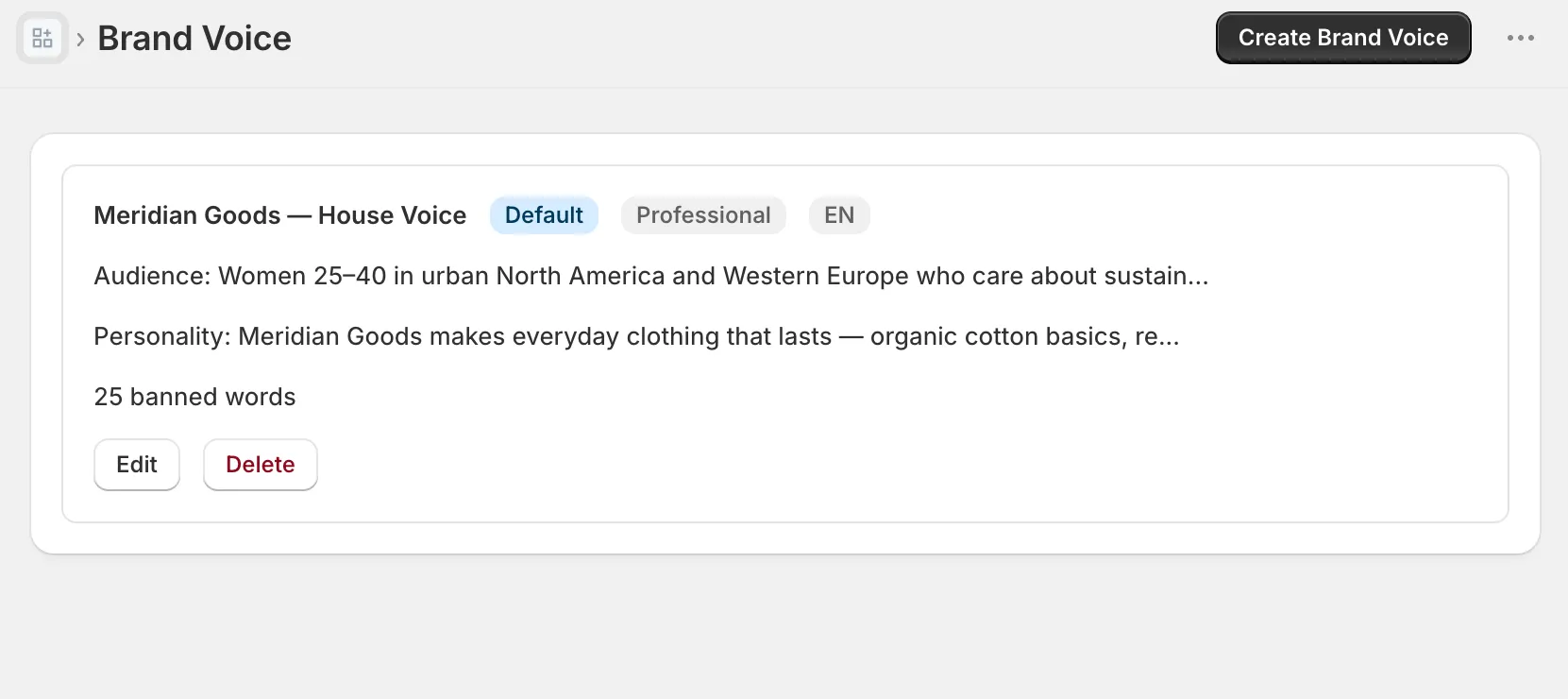
A brand voice is three decisions written down: who your audience is, how you sound, and which words you never use. Structure gets you a good description. Voice is what makes 500 of them feel like one store instead of a flea market.
The three decisions in detail:
- Audience: who actually buys from you, what they care about, what they’re afraid of getting wrong.
- Personality: three adjectives and, more importantly, two example sentences written the way you talk. “Playful” means nothing until you show it.
- Banned words: the claims and clichés you never use. “Revolutionary,” “best in class,” “game-changer,” medical promises. Every banned word is a small trust repair.
Why write it down instead of keeping it in your head? Because consistency degrades with scale. Descriptions written across months, moods, and (if you use one) AI tools drift apart. Page one sounds premium, page forty sounds like a markdown bin. A one-page voice guide holds the line at SKU 500, whether a human or a machine is following it.
The Shopify SEO fields nobody fills: meta title, meta description, alt text
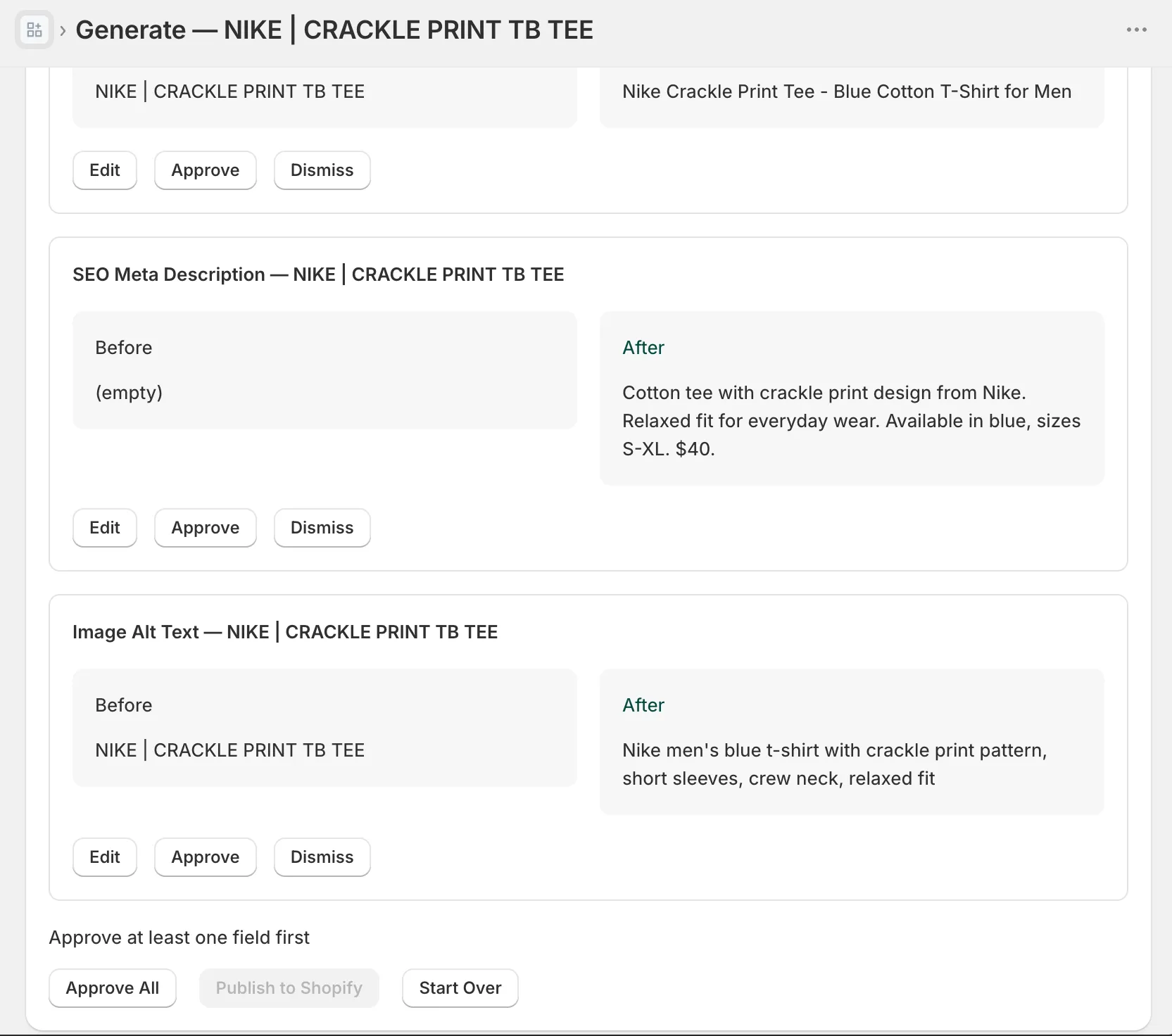
Three SEO fields decide whether shoppers ever reach your description: the meta title (60 characters), the meta description (155 characters), and image alt text (125 characters). All three hide below the fold of the Shopify product editor, and on most stores all three are empty:
Meta title (60 characters max). The headline of your Google result. Shopify defaults it to your product title, which was written for your shelf, not for a search results page. Put the search term near the front, the brand at the end: “Non-Slip Hot Yoga Mat, 6mm | Brandname.”
Meta description (155 characters max). Your free ad copy under that headline. One benefit, one differentiator, one reason to click. Leave it blank and Google assembles something from your page. Sometimes that’s fine. Often it’s a mangled sentence fragment.
Image alt text (125 characters max). How Google Images indexes your product photos and how screen readers describe them. Describe what’s actually in the picture (“hand-poured soy candle in amber glass jar, lit on a wooden table”), not a keyword list. On most stores this field is empty, or still contains the photo’s upload filename, something like IMG_4032-final-2.jpg.
None of these take long individually. Multiplied across a catalog, they’re the same arithmetic problem as descriptions. Which is why they belong in the same workflow, not a separate someday-project.
Before/after examples
Theory is cheap. Here’s the structure applied.
Example 1: supplier text vs. buyer copy
Before:
Portable Blender USB Rechargeable 380ml Mini Juicer Cup Multifunction Fruit Mixer Six Blades High Quality For Home Travel
After:
Blend your protein shake at your desk, not in the office kitchen queue. This 380ml USB-rechargeable blender is small enough for a backpack side pocket and strong enough for frozen fruit.
- 380ml BPA-free cup, doubles as your drinking bottle
- Six stainless-steel blades; crushes ice and frozen berries
- USB-C charging, roughly 15 blends per charge
- One-button operation, splash-proof lid
Wipes clean in seconds. Free shipping and 30-day returns.
Same product, same facts. The first is inventory data. The second is a purchase argument.
Example 2: from an empty field
The most common case isn’t bad copy. It’s no copy. Here’s a generation from my test store: a 30L ski touring backpack whose description field was empty, generated in a defined brand voice and shown in the preview before anything gets published:
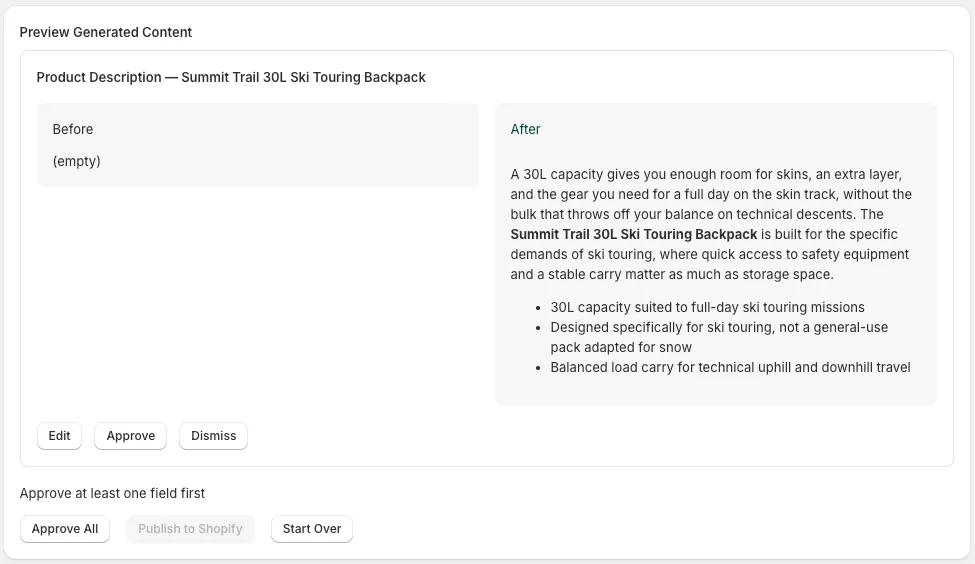
Look at what the generated version does. It opens with capacity and who the pack is for (skins, an extra layer, a full day on the skin track), adds two sentences of context, then drops to spec bullets. That’s the four-part structure from this guide, produced by a defined brand voice instead of a blank page. And the Before column stays untouched until someone clicks Approve.
Where AI fits, and where you still approve every change
Everything above is a checklist you can execute by hand. For a 20-product store, you probably should. The framework breaks at catalog scale: 500 products × (description + meta title + meta description + alt text) is not a writing task, it’s a production line.
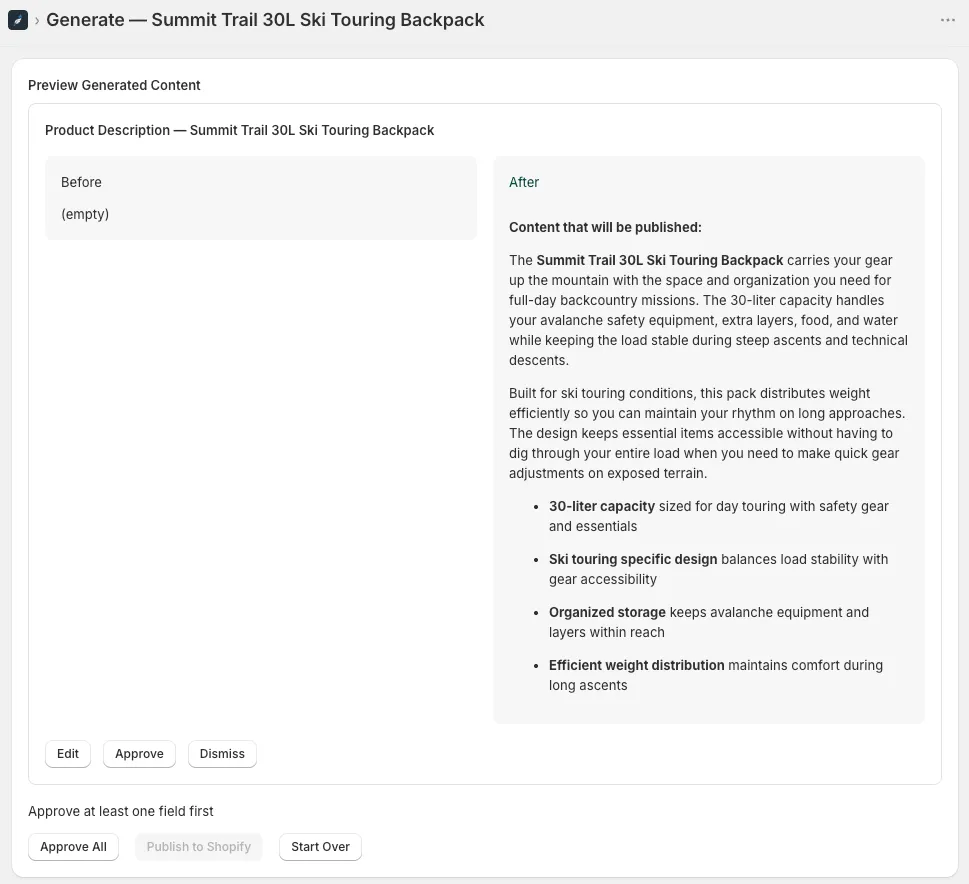
That’s why I built InkForge. (I’m biased, obviously. I built the thing.) The division of labor is the point: AI drafts, you decide. You define the brand voice once, using the same three decisions from this guide. The app generates all four fields per product in that voice. Then comes the step most tools skip: every change shows as a side-by-side diff before anything touches your store. You approve or reject per product, and version history with one-click rollback covers you if a batch needs a redo.
And be honest with yourself about editing: AI output in a defined voice is a strong first draft, not a finished page. Read what you publish. On your bestsellers, the products that pay your rent, edit by hand. The machine’s job is making sure the other 460 products aren’t blank.
InkForge is new. As I write this, it has more articles on this blog than reviews on the App Store. Judge the framework on its own merits; it works with or without my app.
Start with your ten bestsellers: rewrite them with the four-part structure, fill their meta fields, fix their alt text. Measure for two weeks. Then decide whether the rest of the catalog gets the manual treatment or the production line. The free plan covers your first 50 products, so try it on your worst description first.
FAQ: Shopify product descriptions
How long should a Shopify product description be? Match length to price, not to a universal rule. Impulse buys under $25 need 50 to 80 words. Mid-range products do well at 100 to 150. Products over $150 have earned 200+, because the buyer’s research grows with their risk.
Do product descriptions matter for Shopify SEO? Yes, twice over. Unique copy gives Google a reason to rank your page over other stores selling the same item, and your description often feeds the search snippet when the meta description is missing. Duplicate supplier text does the opposite.
Can I use AI to write product descriptions without hurting SEO? Yes. Google’s own guidance targets unhelpful content, not AI content. The rule that matters: AI drafts, you edit and approve. Feed it real product facts and a defined brand voice, and never mass-publish output you haven’t read.