
InkForge vs Avada AI Product Description: which is safer?
This is a comparison between my app and an app with a 4.9 rating and 120 reviews. I’m the zero-review side of that sentence, so bias and method go first: I build InkForge, every number here comes from the two public App Store listings as of August 2026, and where Avada is better I’ll say so in plain words. Starting now: if you want the maximum generated text per dollar, Avada AI Product Description is the better deal, and you can stop reading.
Still here? Then the useful question isn’t which app writes nicer sentences. Both generators produce clean copy from decent inputs. The question that decides whether a bulk edit ends well is what happens between clicking Generate and your live store. That’s the axis this whole comparison runs on.
What Avada AI Product Description does well
Avada AI Product Description earns its 4.9 stars: strong generation, aggressive pricing, and fast iteration since it launched on the App Store in 2025. The listing reads like a volume machine, and the numbers back it: the free plan starts you with 150 credits, and the Pro plan at $14.90 per month includes 5,000 credits, the best credits-per-dollar figure I’ve seen in this category. Pro runs on current frontier models (GPT-4.1 and Claude Sonnet 4), keeps your content structure intact when regenerating, reads product images for context, and covers collections as well as products. Templates, system and custom, keep output consistent across a catalog.
Support is advertised as 24/7. (I sleep. Advantage: Avada.)
If your bottleneck is producing a lot of decent copy cheaply, that’s a real solution and I’d be lying to call it anything else.
What InkForge does differently
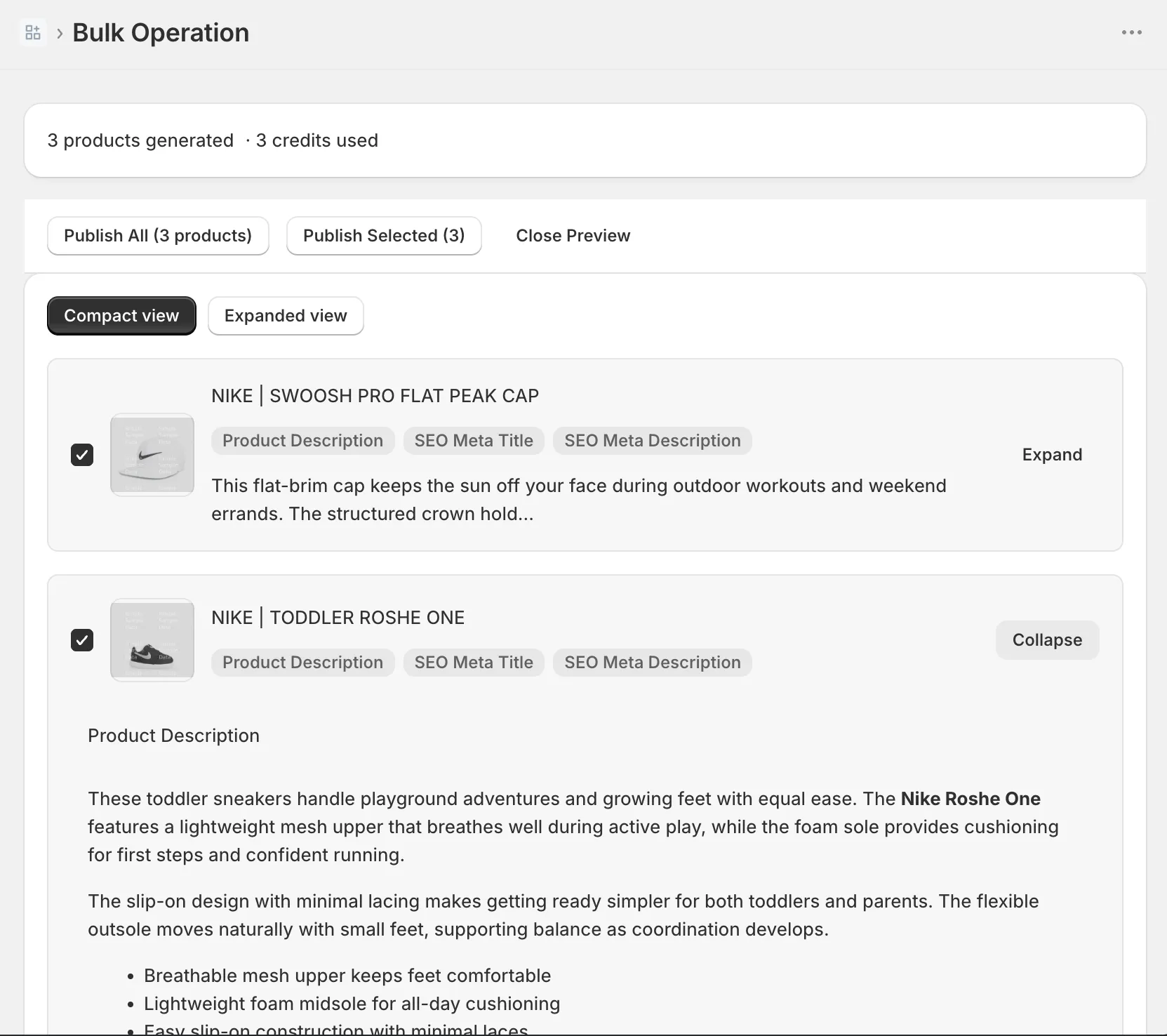
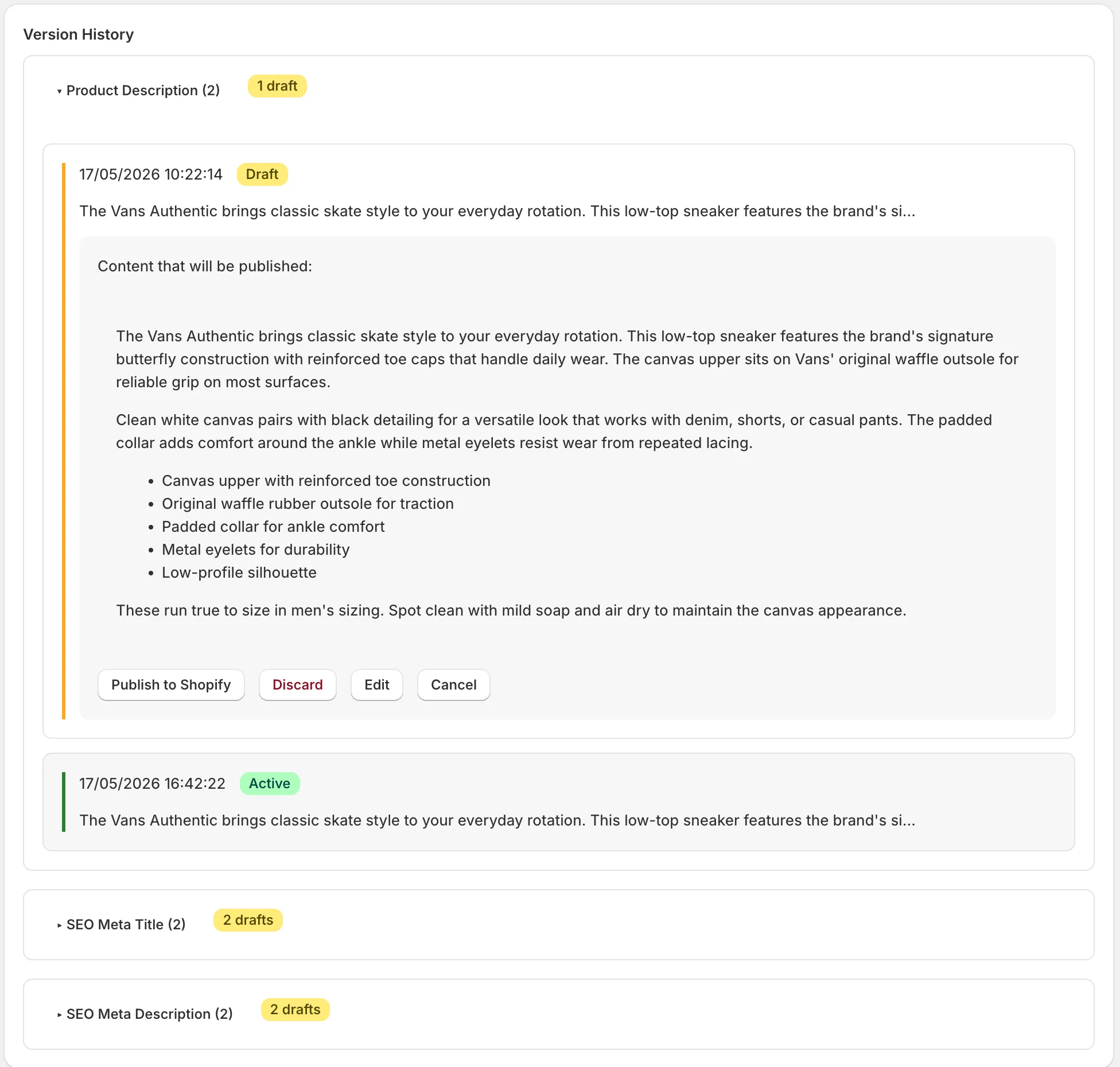
InkForge, an AI product description app for Shopify with preview and rollback, is built around the moment Avada’s listing doesn’t talk about: publishing. Nothing InkForge generates touches your store until you’ve seen it next to what’s currently live. Bulk runs come back as a queue where every product is approved, edited, or rejected on its own. And every field it ever writes is versioned, so any product, or a whole batch, rolls back in one click.
The unit is different too. One credit covers one complete product: the description, the meta title, the meta description, and the image alt text, generated together in a brand voice you define once as three decisions (audience, personality, banned words), in any of 29 languages. Free covers 50 products a month, and the Starter plan at $15 per month covers 500.
Full disclosure, again: InkForge launched in May 2026 and has zero reviews as I write this. Avada has 120. That’s real information, and you should weigh it.
InkForge vs Avada, field by field
Everything below reflects the two public listings as of August 2026. “Not in listing” means the listing doesn’t mention it, which is worth knowing before a bulk run, even if the app quietly does more.
| InkForge | Avada AI Product Description | |
|---|---|---|
| Rating (reviews) | none yet | 4.9 stars (120) |
| On App Store since | May 2026 | 2025 |
| Free plan | 50 credits/mo | 150 credits |
| Cheapest paid | $15/mo, 500 credits | $14.90/mo, 5,000 credits |
| What one credit buys | one product: description, meta title, meta description, alt text | one generation (model varies by plan) |
| Bulk generation | yes, with per-product approval | yes, products and collections |
| Preview before publish | side-by-side diff | not in listing |
| Approve or reject per product | yes | not in listing |
| Version history and rollback | yes, one click | not in listing |
| Brand voice | audience, personality, banned words | system and custom templates |
| Image alt text | yes | not in listing |
| Languages | 29 | multiple, no count listed |
| Support | 24/7 |
The safety question: what happens after Generate
As of August 2026, Avada’s listing doesn’t mention a preview step, per-product approval, or rollback, and InkForge is built around exactly those three. That’s the entire safety comparison, and you can verify it in two browser tabs.
Two fairness notes before I lean on that. First, absence from a listing isn’t proof of absence from the app; some review capability may exist that the listing doesn’t advertise. But a feature that decides whether your catalog survives a bad batch shouldn’t be something you discover after installing. Second, Avada’s public complaints aren’t about content: its one negative review as I write this concerns billing, not overwritten descriptions. This section isn’t an accusation. It’s about which failure modes each app makes impossible by design.
Here’s the definition I keep coming back to: bulk safety is three features, a preview diff before publishing, approval per product, and version history with rollback. Shopify itself provides none of the three for product content, so they have to live in the app doing the writing.
The rollback half matters more than it sounds, because your first brand voice is usually slightly wrong and the fix is regenerating. Regenerating is only stress-free when the previous version is one click away.
And whichever app wins you over, take the free safety net that works with both: Products, Export, CSV, before every batch. It’s step 4 of the bulk cleanup workflow and it costs 30 seconds.
Price: Avada wins on credits, so read what a credit buys
On price per generated text, Avada wins by an order of magnitude: $14.90 buys 5,000 credits there, while $15 buys 500 at InkForge. I’m not going to pretend otherwise, and if that’s your metric, you already have your answer.
What the $15 buys at InkForge is a different unit: 500 complete products, each with all four fields filled, each previewed against the live version, each reversible. My honest advice, and it’s advice against my own revenue half the time: pay for InkForge only if that reviewed, reversible pipeline is worth something to your store. If you’d skip the review pass anyway, Avada is the rational choice and you’ll get more raw output for the same money.
Which one for your store
Choose by the job in front of you, not by this blog:
- Choose Avada if you want volume: thousands of cheap generations, templates for consistency, model choice, collections covered, support at 3am.
- Choose InkForge if you want control: bulk edits you inspect before they publish, a per-product yes or no, four SEO fields per credit, and an undo that’s one click, not a support ticket.
- Unsure? Both have free plans. Run the same 20 products through each and compare what lands in your store, and how much you got to see before it did. If you start with mine, point it at your worst description first; the free 50 products are enough to judge.
There’s no lock-in risk in trying both, and that’s worth saying out loud. A description app writes product data, not theme code, so uninstalling one shouldn’t leave anything behind in your storefront. That’s true of InkForge by design, and nothing on Avada’s listing suggests otherwise. The only thing you can’t take back is an unreviewed bulk publish, which is this whole comparison in one sentence.
For the wider field, including Profitonium and StoreYa, the 2026 category comparison covers all four apps with the same rules.
FAQ: InkForge vs Avada
Is Avada AI Product Description good? Yes. As of August 2026 it holds 4.9 stars across 120 reviews, gives you 5,000 credits for $14.90 a month, and offers custom templates, frontier AI models, an image reader, and 24/7 support. It’s a strong generator; the open question on its listing is what review and undo options surround the generation.
What’s the real difference between InkForge and Avada? The unit and the workflow. Avada sells volume: thousands of cheap generation credits. InkForge sells a reviewed pipeline: one credit covers a full product (description, meta title, meta description, alt text), every change previews as a diff, bulk runs are approved per product, and version history rolls anything back in one click.
Which is cheaper, InkForge or Avada? Per generated text, Avada by a wide margin: $14.90 buys 5,000 credits versus $15 for 500 at InkForge. Per complete, previewed, reversible product, InkForge’s $15 covers 500 products with all four fields. The cheaper app depends on which unit you’re actually buying.