
Fashion product descriptions: the seasonal refresh
Fashion is the biggest category on Shopify: Store Leads counts 27.0 percent of stores in apparel as of September 2026, which is roughly one store in four. It’s also the category where product copy expires on a schedule. A candle description can survive three years; a description written for last autumn’s drop is wrong by spring, and everyone can tell.
So fashion product descriptions aren’t a writing problem, they’re a rewriting problem. The catalog turns over two to four times a year by design, every turn arrives with the same deadline panic, and almost no store has a repeatable workflow for it. This guide is that workflow: what fashion copy has to cover, and the refresh that gets a new season live in an afternoon instead of two weeks.
Why fashion product descriptions expire
Fashion product descriptions age faster than any other category’s because the catalog changes by design: seasonal collections, drops, capsules, and colorways, each with copy written under deadline. Three kinds of debt pile up at every turn:
Season references rot. “Perfect for summer evenings” sells a linen shirt in June and undercuts the same shirt in October. Copy that names a season has that season’s shelf life.
The voice drifts. Each drop gets written in a different week, in a different mood, sometimes by a different person. By the third drop, the store speaks three dialects, and the catalog reads like a multi-brand outlet.
Re-listed pieces lose their history. A best-selling coat comes back every winter, and every winter someone rewrites its page from scratch because last year’s copy is gone. Shopify keeps no version history of product content, so whatever you overwrote in March doesn’t exist in November.
(Nothing ages a product page like the word “new”.)
What every fashion description needs
A fashion description earns its space by answering five questions, and the fit question outranks the rest:
| Element | The question it kills |
|---|---|
| Who it’s for, and when | ”Is this my style, my occasion?” |
| Fit and sizing line | ”Will it fit me?” |
| Fabric and feel | ”What does it feel like on?” |
| Care | ”Will I ruin it in the wash?” |
| Shipping and returns | ”What if I’m wrong?” |
My opinion, and I’d defend it against any copywriter: the fit line is the highest-value sentence in fashion copy. “True to size, model is 178 cm and wears M” answers the question every apparel buyer is asking and pre-empts the most common reason apparel gets returned in ten words. Put it in every apparel description, same place, same format. The consistency is what makes it trustworthy: shoppers learn your store tells them how things fit.
The rest follows the same structure as every other category, a benefit-led opening for one specific wearer, sensory detail, scannable specs, reassurance close. Fabric is where the sensory work happens: “midweight 240gsm cotton that holds its shape” beats “high quality material” in any season.
The seasonal refresh workflow
A seasonal refresh is a copy operation with four steps: archive the outgoing collection’s copy, generate the incoming drop in your brand voice, review every piece before it publishes, and re-aim your bestsellers’ meta fields at the season. In order:
- Snapshot everything first. Products, Export, CSV. Thirty seconds, and every current description, meta field, and alt text is saved before anything gets overwritten. This is the step that makes re-listed pieces free next year, and it’s the same discipline as any safe bulk edit.
- Tune the voice before the batch. Read the incoming drop’s mood board against your brand voice guide and adjust the example sentences if the season calls for it. One voice per store, or one per collection if your lines genuinely differ; fifty voices is the same as none.
- Batch-generate the new drop, then review per piece. Run the whole drop through your generator in that voice, then walk the results one by one: approve, edit, or reject. The fit lines deserve human eyes on every piece, because the AI can’t know how the sample fit.
- Refresh the bestsellers’ meta fields. The pieces that carry over should stop advertising last season in their meta titles and descriptions. That’s a 20-minute pass over your top 30, not a catalog project.
Carry-over pieces get their own shortcut. A style returning from last year doesn’t need new copy, it needs last year’s copy back with the season references updated: restore the archived version, swap “layered over knits” for “over a t-shirt”, done in a minute. And while each piece is open, glance at its image alt text; new photography arrives every season, and the alt text should describe the photo that’s actually there, not the one from two drops ago.
That’s the whole ceremony: one afternoon, repeatable at every turn, and nothing published unread.
Holding the voice across five drops a year
The part of this workflow I built into my own app is the part that resists doing by hand: keeping one voice and one safety net across a catalog that never stops moving. In InkForge, an AI product description app for Shopify with preview and rollback, the brand voice is stored once, audience, personality, banned words, and every drop generates in it: description, meta title, meta description, and image alt text per piece, one credit each. Bulk runs come back as a queue with per-piece approval, and version history keeps every season’s copy restorable, so a returning coat is a rollback, not a rewrite.
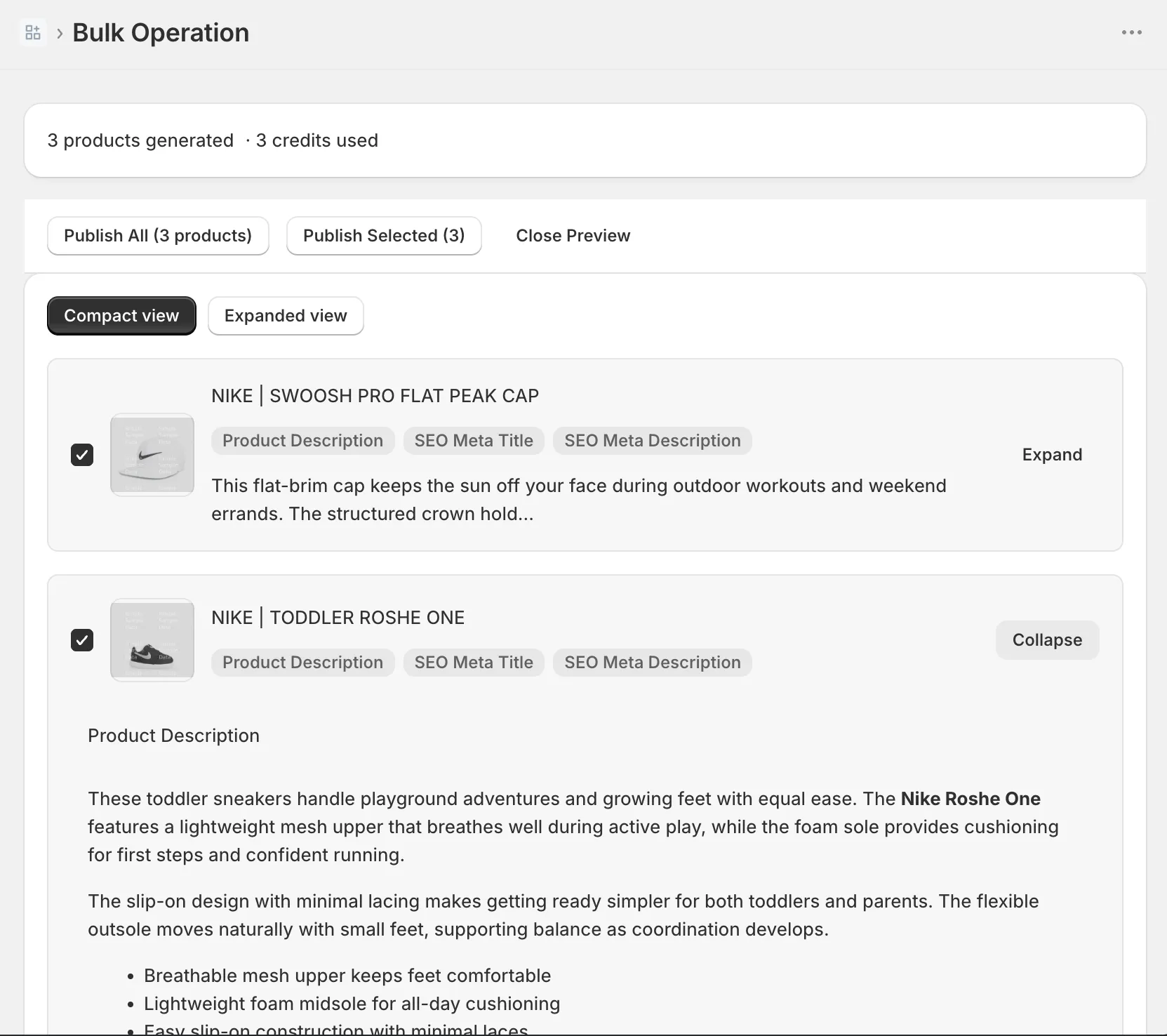
The credit math for a fashion calendar: a 120-piece drop is 120 credits, so the free plan’s 50 credits a month covers a capsule, and the $15 Starter plan’s 500 covers a full seasonal changeover with room for the meta-field refresh. Credits reset monthly, which happens to fit how drops arrive.
Start with the changeover in front of you
Whichever tools you use, run the four steps on the next drop instead of reading about them twice: snapshot, voice check, batch with review, meta refresh. The first refresh takes the afternoon; the ones after inherit the voice and the archive, and get faster.
If you want the batch, the preview, and the archive in one place, the free plan covers your next capsule: 50 pieces, fit lines included, nothing published until you’ve read it.
FAQ: fashion product descriptions
How often should fashion product descriptions be updated? At every catalog turn: the spring/summer and autumn/winter changeovers at minimum, plus each drop or capsule in between. Evergreen basics can keep their copy for years; seasonal pieces need descriptions written for the season they’re actually selling in.
What should a fashion product description include? Five things: who the piece is for and when they’d wear it, a fit and sizing line (true to size or not, what the model wears), fabric and feel, care instructions, and the shipping and returns close. The fit line matters most; it answers the question every buyer asks before ordering and the most common reason apparel gets returned, at once.
How do I refresh descriptions for a new season without losing the old copy? Snapshot before you overwrite: export your products to CSV so every current description is saved, or use a description tool with version history so each product’s previous copy stays one click from restored. Pieces that return next year get their copy back instead of a rewrite.